Your roadmap for the session
How to approach building AI agents from scratch
Overview of popular tools (no-code & code)
Live demonstrations of selected tools
Best practices and common pitfalls to avoid
Goal: By the end of this session, you'll have a clear roadmap for building your first AI agent, knowledge of popular tools, and practical insights to get started.
Understanding autonomous AI systems
An AI agent is an autonomous system that can perceive its environment, make decisions, and take actions to achieve specific goals
Operates without constant human intervention
Accesses and uses various tools and APIs
Remembers context and past interactions
Breaks down complex tasks into steps
Unlike simple chatbots, AI agents can take actions in the real world by using tools, maintaining context, and working towards goals autonomously.
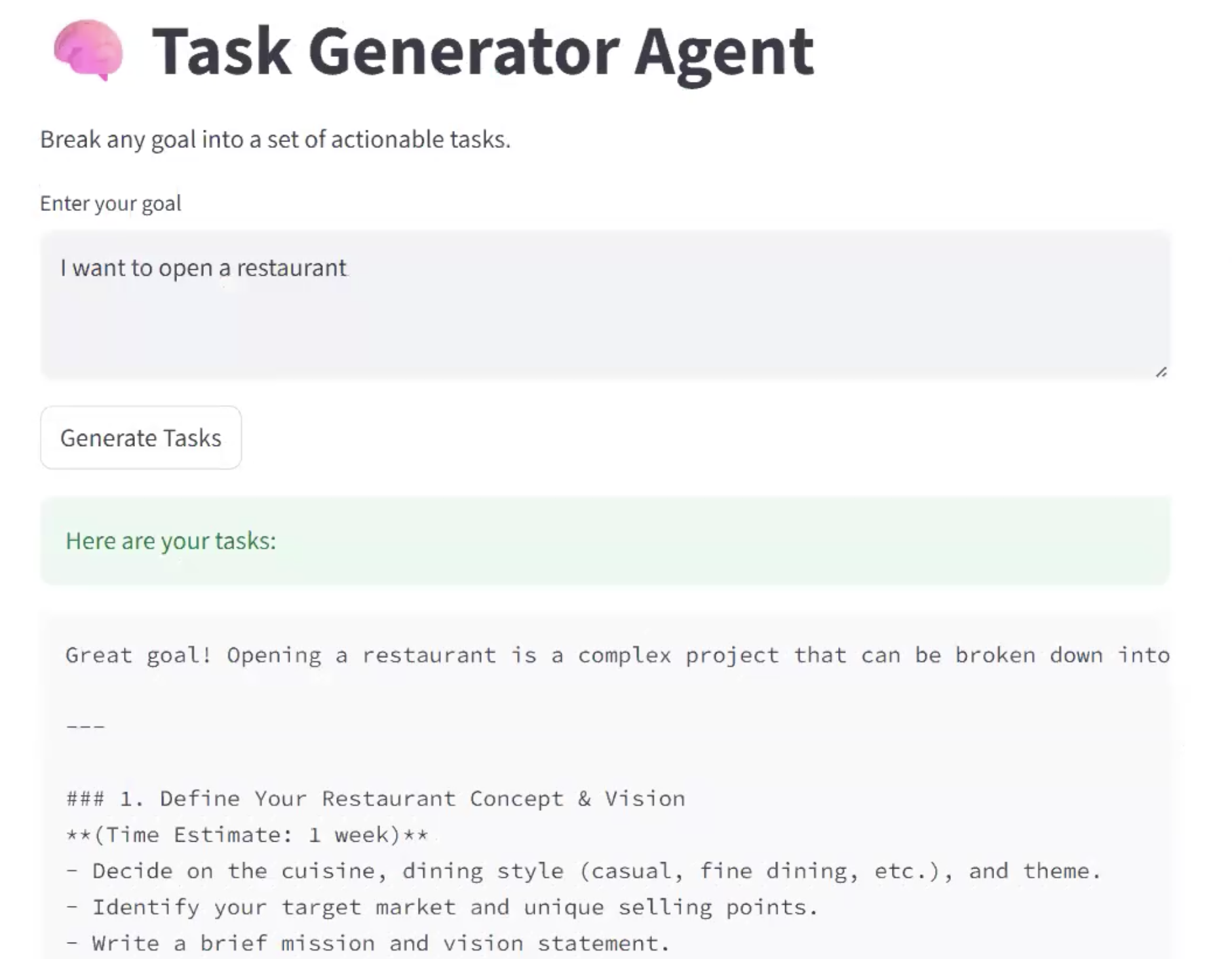
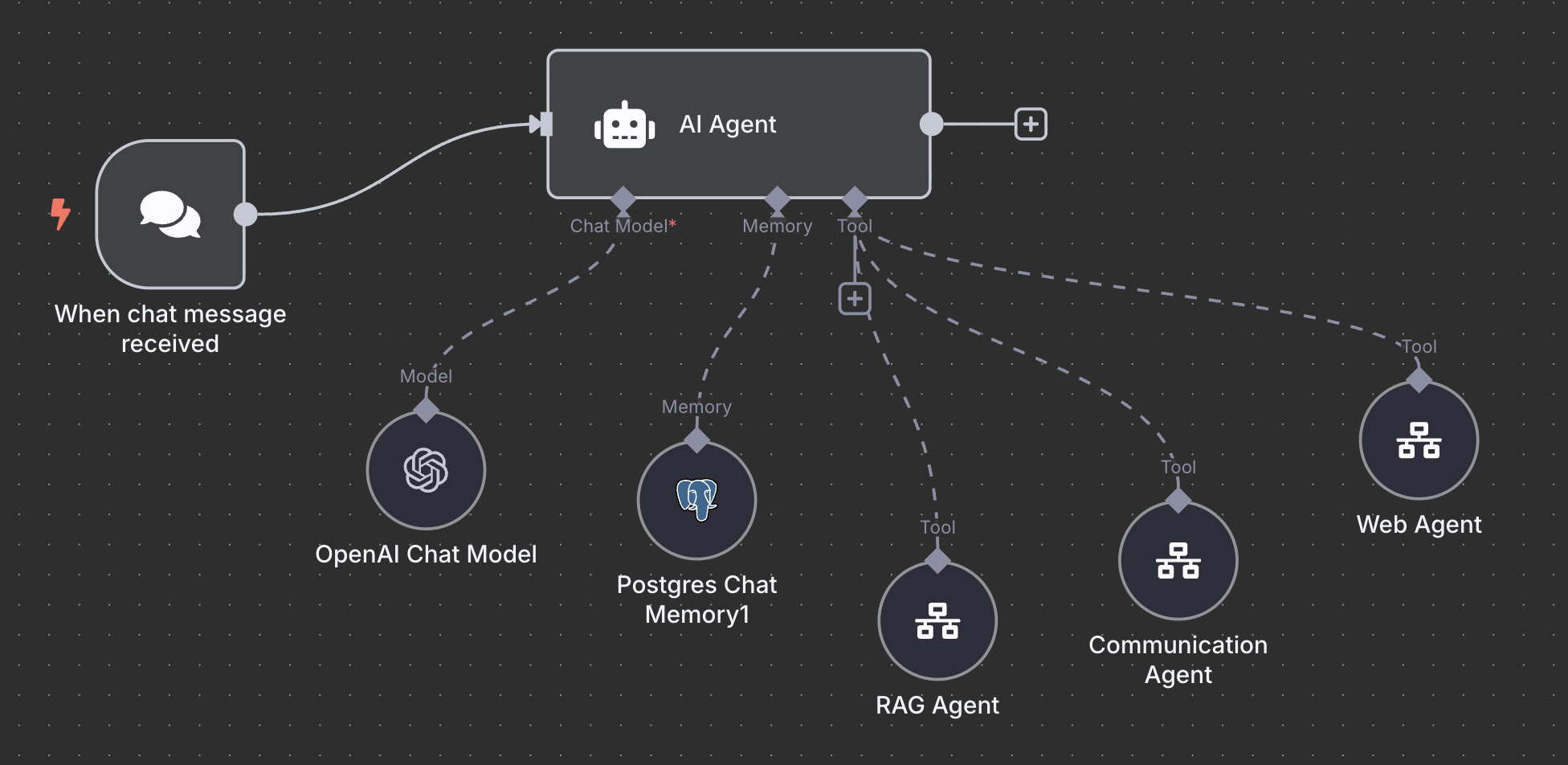
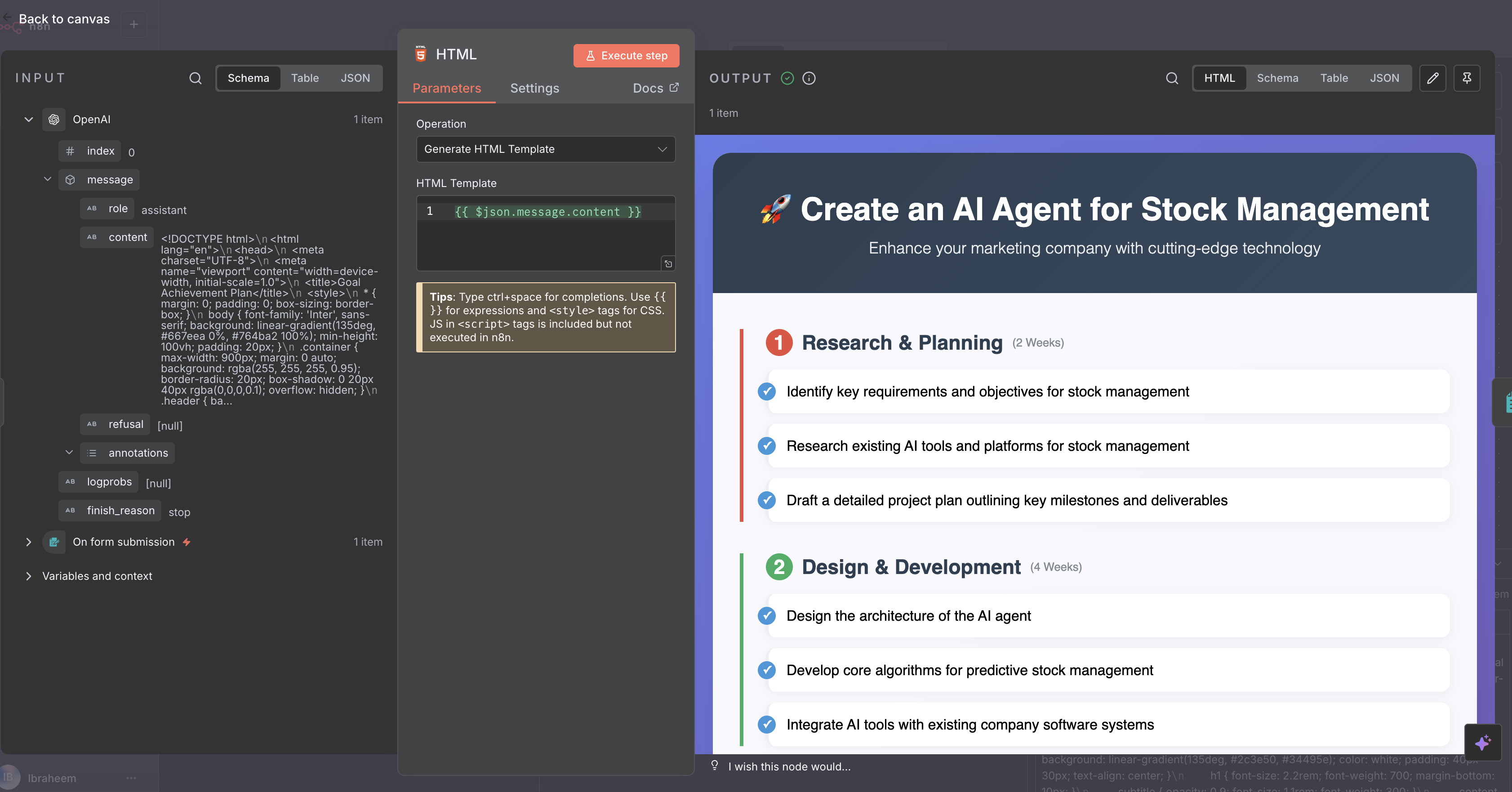
n8n visual workflow + AI = Beautiful results
Drag & drop nodes
Complete workflow
Smart planning
Professional HTML
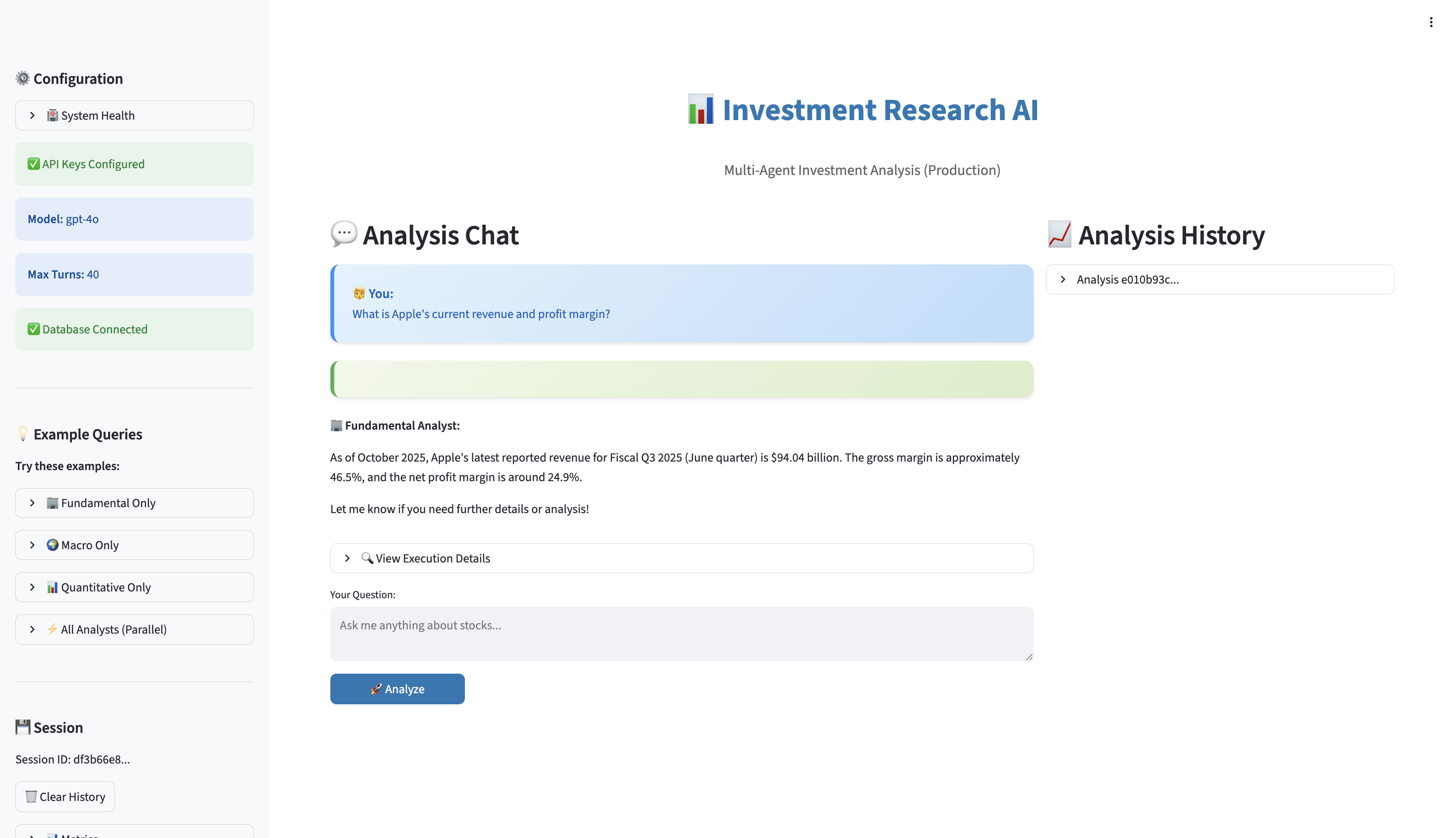
Streamlit + OpenAI Agents SDK
Made in the AI Agent Bootcamp
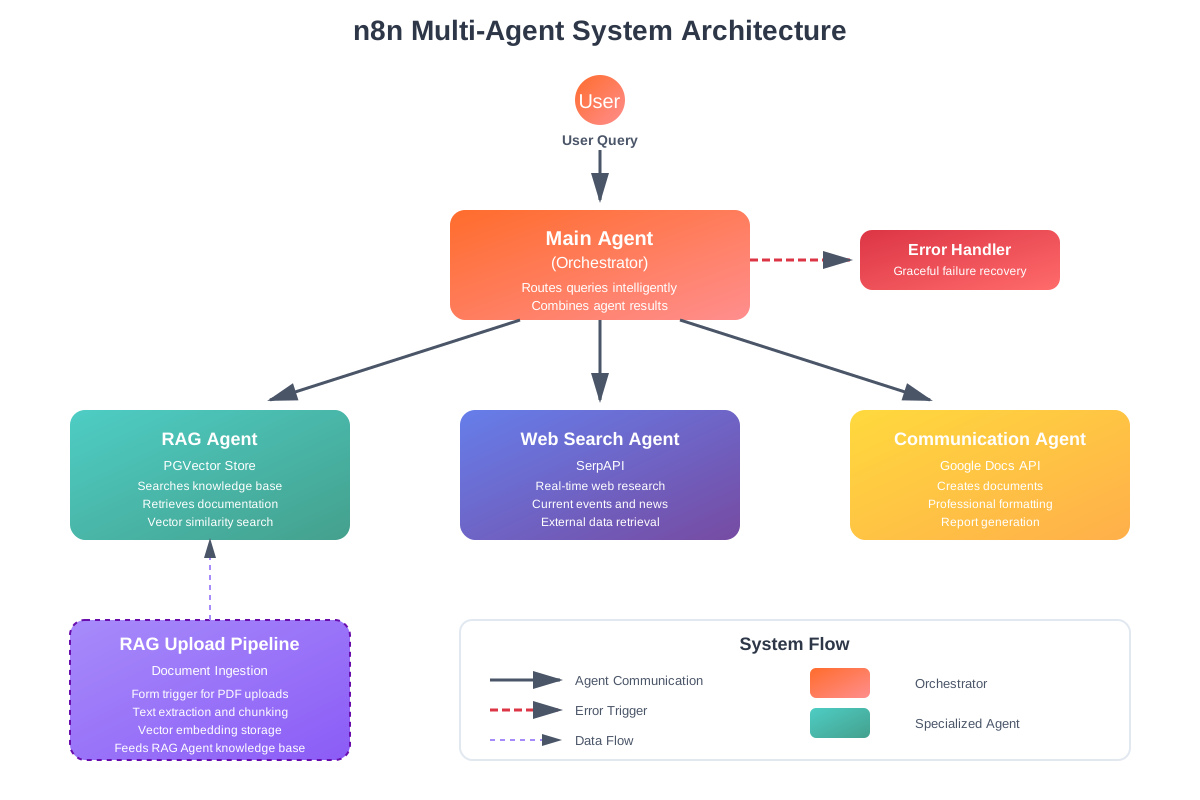
Intelligently routes user queries to specialized agents, combines results, and maintains conversation context
Searches internal knowledge base using vector similarity, retrieves company documentation and policies
Performs real-time internet research for current events, news, and external data using SerpAPI
Creates and formats professional reports in Google Docs, handles document generation
Hierarchical Architecture
PGVector RAG
Live Web Search
Google Docs API
Built in the AI Agent Bootcamp
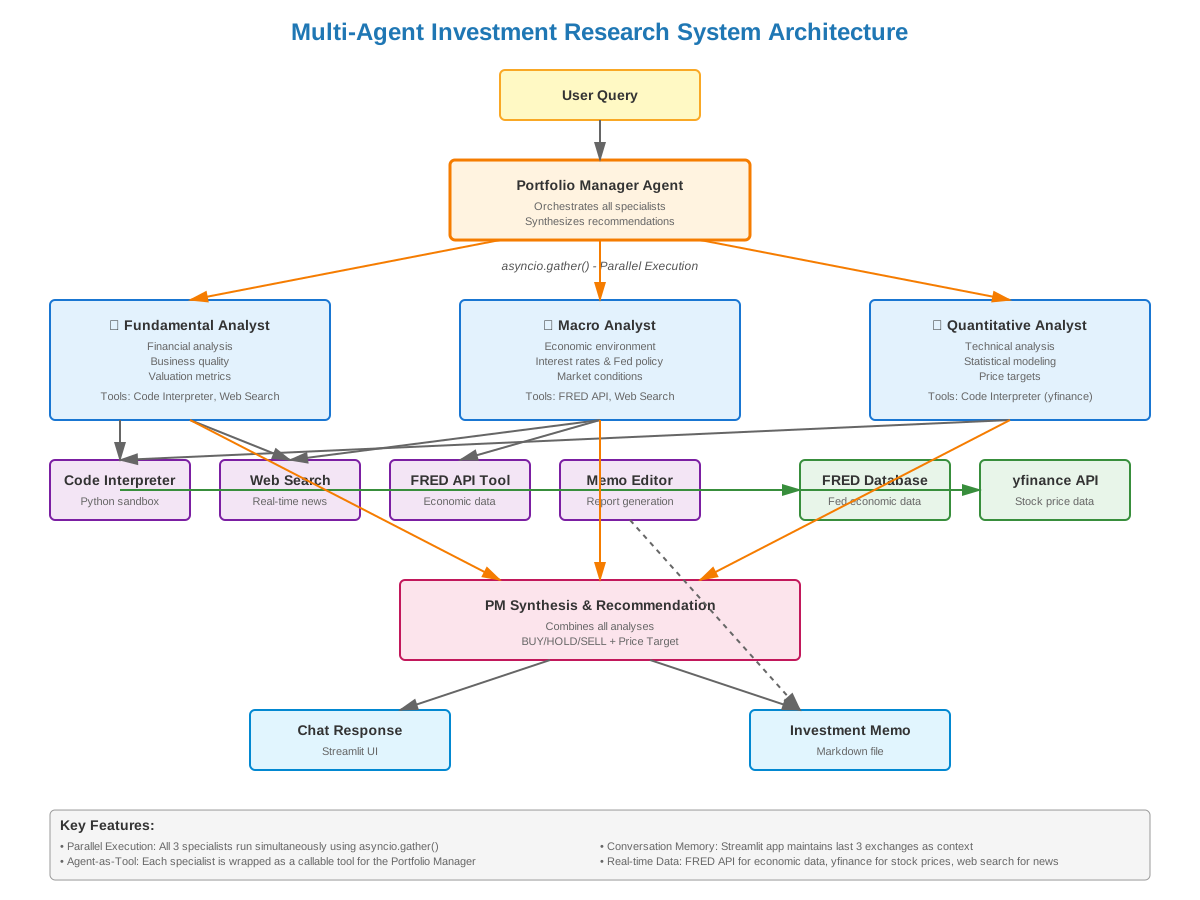
investment-agents/ ├── research_agents/ │ ├── portfolio_manager.py │ ├── fundamental_analyst.py │ ├── macro_analyst.py │ └── quantitative_analyst.py ├── tools/ │ ├── fred_api.py │ └── memo_editor.py ├── prompts/ │ └── *.md (agent instructions) ├── database/ │ ├── models.py │ └── memory.py ├── streamlit_app/ │ └── app.py └── main.py
@function_tool
async def run_all_specialists_parallel(
query: str
) -> str:
"""Run 3 agents simultaneously"""
tasks = [
Runner.run(fundamental_agent, query),
Runner.run(macro_agent, query),
Runner.run(quant_agent, query),
]
# Execute in parallel - 3x faster!
results = await asyncio.gather(*tasks)
return combine_analyses(results)
4 Specialist Agents
Parallel Processing
PostgreSQL + Vector
Heroku Deployed
Your step-by-step framework
Best for: Quick prototypes, simple workflows, non-technical users
Pros: Fast, visual, easy to modify
Cons: Less flexibility, potential scaling limits
Best for: Complex logic, custom integrations, production systems
Pros: Full control, scalable, customizable
Cons: Requires coding skills, longer development time
The building blocks of AI agents
The reasoning engine - choose GPT-4, Claude, or Gemini based on your needs
Clear prompts defining the agent's role, capabilities, and constraints
Functions the agent can call (APIs, databases, calculators, etc.)
Context storage for conversations and long-term information
Safety measures and output validation
The logic that connects everything together
Pro Tip: Start simple with just LLM + Instructions + 1-2 Tools. Add complexity as needed.
Curated selection with highest adoption
Selected tools with the highest adoption and community support
We've curated the most popular options for building AI agents in 2025, covering both visual builders and code frameworks.
15
Visual builders for creating agents without writing code
13
SDKs and frameworks for programmatic agent development
Visual builders for every skill level
When to use no-code: Rapid prototyping, simple workflows, business users without coding experience, quick MVPs
Visual workflow automation
Advanced automation platform
Automation with AI agents
Agent workflow builder
AI agent platform
AI app builder
Open-source LLM platform
Visual LangChain builder
Drag-and-drop LLM apps
OpenAI toolkit
Google builder
AgentCore
Enterprise
CRM agents
Enterprise
SDKs and frameworks for developers
When to use code: Complex logic, custom integrations, production deployments, full control over behavior, advanced use cases
Official OpenAI framework
Strands Agents on AWS
Agent Development Kit
Open-source multi-agent framework
Open-source SDK for AI apps
Most popular
State-based
Multi-agent
Autonomous
Function-calling
NLP framework
Type-safe
Hugging Face
Compare and choose the right approach
| Criteria | No-Code | Code-Based |
|---|---|---|
| Learning Curve | Low - Visual interface | High - Requires programming |
| Development Speed | Very Fast - Hours/days | Slower - Days/weeks |
| Customization | Limited to platform features | Unlimited flexibility |
| Scalability | Depends on platform limits | Highly scalable |
| Cost | Platform subscription fees | Development time + infrastructure |
| Maintenance | Platform handles updates | You manage everything |
| Integration | Pre-built connectors | Custom integrations |
| Best For | MVPs, simple workflows, business users | Production apps, complex logic, custom needs |
Recommendation: Start with no-code to validate your idea quickly. Move to code when you need more control or hit platform limitations.
The "USB for AI Agents"
A universal standard that lets AI agents connect to any tool or data source seamlessly
Think of MCP as USB for AI - one standard that connects everything. We cover MCP tool creation in the Bootcamp!
Measure to improve agent performance
Run multiple test cases through your agent to measure performance, catch issues, and iterate on your prompts.
Build a spreadsheet with various inputs to test different scenarios
Execute all test cases and capture agent outputs automatically
Review results, adjust prompts, and re-test to improve performance
Helpfulness: How useful is the response?
Correctness: Is the information accurate?
Format: Does it match expected structure?
Custom: Your specific business metrics
The Bootcamp covers building complete evaluation pipelines with automated scoring!
From development to production
Run evaluations across all test cases
Track usage, errors, and performance metrics
Content filtering, rate limits, error handling
Start with small user group, scale up
Regular evaluations, prompt updates, feature additions
Toggle your workflow from "inactive" to "active" to make it live
Track your agent's performance in production
Learn production-ready deployment strategies in the AI Agent Bootcamp!
Learn from common mistakes
Problem: Agent doesn't know what to do
Solution: Be extremely specific about role, tasks, and expected behavior
Problem: Agent gets confused choosing tools
Solution: Start with 2-3 essential tools, add more only when needed
Problem: Context grows too large, costs spike
Solution: Implement token limits and summarization strategies
Problem: Agent crashes on unexpected inputs
Solution: Validate inputs, catch exceptions, provide graceful failures
Problem: API costs spiral out of control
Solution: Set spending limits, cache responses, use cheaper models where possible
Problem: Users wait too long for results
Solution: Optimize prompts, reduce tool calls, use streaming responses
Follow this step-by-step plan
Ready to build your first agent? Follow this step-by-step plan:
What problem will your agent solve? Write it down in one clear sentence.
No-code (n8n, Make) for quick start or Code (OpenAI SDK, LangChain) for flexibility
Build a basic agent with just instructions and one tool. Test it thoroughly.
Add more tools, refine instructions, improve error handling based on testing.
Launch to real users, track performance, gather feedback, and continuously improve.
Ready to build your first AI agent?
Visit our website to learn more about the AI Agent Bootcamp & community.
lonelyoctopus.com
Questions? Reach out to
contact@lonelyoctopus.com